Bypassing Android's 30-Minute Widget Update Limit
A workaround against android's limitation of updating widget every 30 minutes
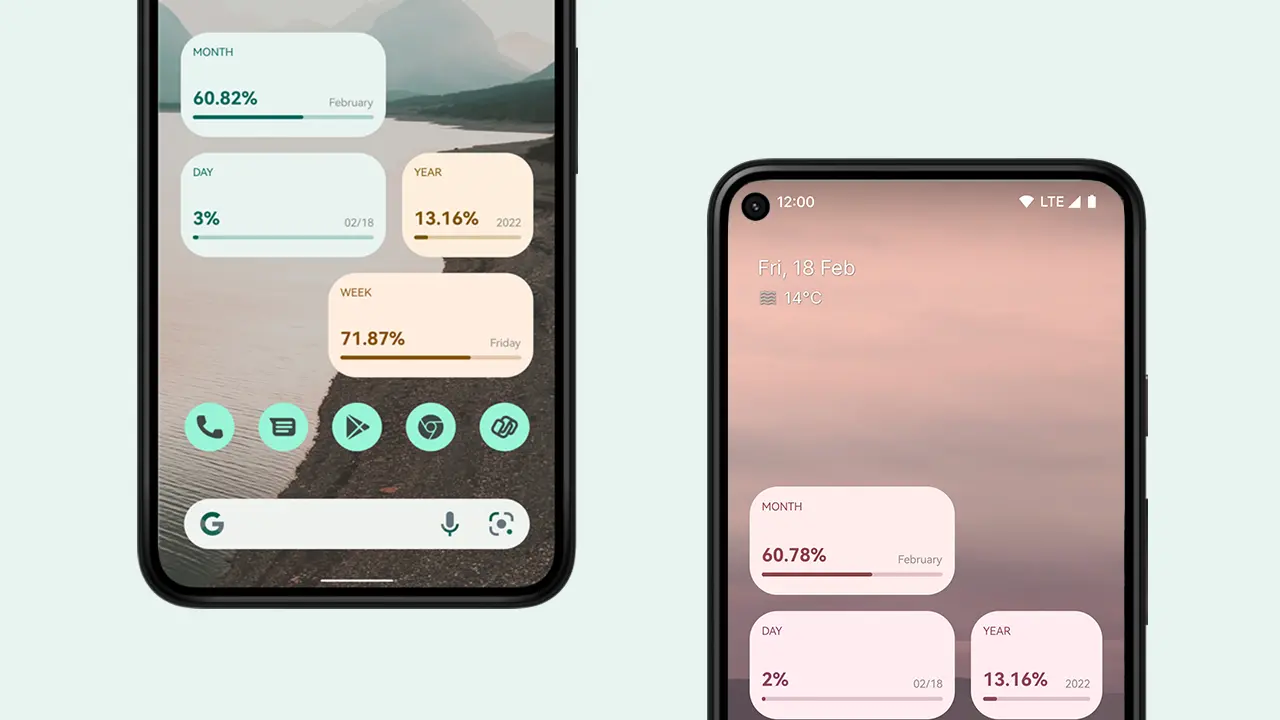
Android widgets have a well-known limitation: the system only calls AppWidgetProvider.onUpdate() roughly every 30 minutes. For yearly progress widget needs to update every second.
So, I bypassed it using a three-layer architecture that achieves per-second updates.
The Problem
When you implement AppWidgetProvider, the system controls when onUpdate() fires. The minimum interval is ~30 minutes (defined by AppWidgetManager.ACTION_APPWIDGET_UPDATE).
Solution: Manual calls to AppWidgetManager.updateAppWidget(). It does not have any such restriction.
The Architecture: Three Layers
┌────────────────────────────────────────────────────────────────┐
│  Layer 1: AlarmManager (every 5 seconds)                       │
│  └─► Schedules repeating alarm                                 │
└──────────────────────────┬─────────────────────────────────────┘
                           ▼
┌────────────────────────────────────────────────────────────────┐
│  Layer 2: BroadcastReceiver                                    │
│  └─► Receives alarm, fans out APPWIDGET_UPDATE to ALL widgets  │
└──────────────────────────┬─────────────────────────────────────┘
                           ▼
┌────────────────────────────────────────────────────────────────┐
│  Layer 3: Per-Widget Coroutine Loop (every 1 second)           │
│  └─► Each widget runs infinite loop calling updateAppWidget()  │
└────────────────────────────────────────────────────────────────┘
Layer 1: AlarmManager — The Heartbeat (Every 5 Seconds)
WidgetUpdateAlarmHandler.kt schedules a repeating alarm that fires every 5 seconds:
// app/src/main/java/com/a3/yearlyprogess/feature/widgets/update/WidgetUpdateAlarmHandler.kt
class WidgetUpdateAlarmHandler(private val context: Context) {
  private val am = context.getSystemService(Context.ALARM_SERVICE) as AlarmManager?
  private val intent = Intent(context, WidgetUpdateBroadcastReceiver::class.java)
  private val service = 100  // Unique request code

  fun setAlarmManager() {
    val sender = PendingIntent.getBroadcast(
      context, service, intent, PendingIntent.FLAG_IMMUTABLE
    )
    val c = Calendar.getInstance()
    val l = c.timeInMillis + (5 * 1000)  // 5 seconds from now
    am?.set(AlarmManager.RTC, l, sender)
  }

  fun cancelAlarmManager() {
    val sender = PendingIntent.getBroadcast(
      context, service, intent, PendingIntent.FLAG_IMMUTABLE
    )
    am?.cancel(sender)
  }
}
Why 5 seconds? It's frequent enough to keep the broadcast chain alive, but sparse enough to be battery-friendly. The real per-second work happens in Layer 3.
Key details:
AlarmManager.RTC— Uses real-time clock (wakes device if asleep)PendingIntent.FLAG_IMMUTABLE— Required for Android 12+- Single
PendingIntentwith fixed request code (100) allows easy cancellation
Layer 2: BroadcastReceiver — The Fan-Out
WidgetUpdateBroadcastReceiver receives the alarm and manually broadcasts APPWIDGET_UPDATE to every widget instance:
// app/src/main/java/com/a3/yearlyprogess/feature/widgets/update/WidgetUpdateBroadcastReceiver.kt
@AndroidEntryPoint
class WidgetUpdateBroadcastReceiver : BroadcastReceiver() {

  override fun onReceive(context: Context, intent: Intent) {
    val pendingResult = goAsync()  // Critical: extends execution time
    val scope = CoroutineScope(SupervisorJob() + Dispatchers.Main.immediate)

    scope.launch {
      try {
        // 1. Update ALL widget types
        val totalWidgetCount = updateAllWidgets(context)

        // 2. Handle notification settings (optional)
        val settings = appSettingsRepository.appSettings.first()
        // ... notification logic ...

        // 3. Reschedule or cancel alarm
        if (totalWidgetCount == 0 && !settings.notificationSettings.progressShowNotification) {
          WidgetUpdateAlarmHandler(context).cancelAlarmManager()
        } else {
          WidgetUpdateAlarmHandler(context).setAlarmManager()  // Re-arm for next 5s
        }
      } catch (e: Exception) {
        Log.e(TAG, "Error during widget update", e)
      } finally {
        pendingResult.finish()
        scope.cancel()
      }
    }
  }

  private fun updateAllWidgets(context: Context): Int {
    val widgetClasses = arrayOf(
      DayWidget::class.java, DayLightWidget::class.java, NightLightWidget::class.java,
      WeekWidget::class.java, MonthWidget::class.java, YearWidget::class.java,
      EventWidget::class.java, CalendarWidget::class.java, AllInWidget::class.java
    )

    var totalWidgetCount = 0
    widgetClasses.forEach { widgetClass ->
      val widgetIntent = Intent(context, widgetClass).apply {
        action = AppWidgetManager.ACTION_APPWIDGET_UPDATE
      }
      val ids = AppWidgetManager.getInstance(context)
        .getAppWidgetIds(ComponentName(context, widgetClass))

      if (ids.isNotEmpty()) {
        widgetIntent.putExtra(AppWidgetManager.EXTRA_APPWIDGET_IDS, ids)
        context.sendBroadcast(widgetIntent)  // Triggers each widget's onUpdate()
        totalWidgetCount += ids.size
      }
    }
    return totalWidgetCount
  }
}
Critical pieces:
goAsync()— Gives you ~10 seconds to complete async work (vs ~100ms default)SupervisorJob()— One widget failing doesn't cancel others- Manual
sendBroadcast()withEXTRA_APPWIDGET_IDS— Targets specific widget instances - Re-arms the alarm at the end (creates the 5-second loop)
Layer 3: BaseWidget — The Per-Second Loop
Each widget extends BaseWidget, which starts an infinite coroutine updating every 1 second:
// app/src/main/java/com/a3/yearlyprogess/feature/widgets/ui/BaseWidget.kt
abstract class BaseWidget : AppWidgetProvider() {

  abstract fun updateWidget(context: Context, appWidgetId: Int): RemoteViews

  override fun onUpdate(context: Context, appWidgetManager: AppWidgetManager, appWidgetIds: IntArray) {
    for (appWidgetId in appWidgetIds) {
      updateAppWidget(context, appWidgetManager, appWidgetId)
    }
  }

  private fun updateAppWidget(context: Context, appWidgetManager: AppWidgetManager, appWidgetId: Int) {
    updateJob?.cancel()  // Cancel any existing loop for this widget

    // Launch coroutine for async updates
    updateJob = CoroutineScope(Dispatchers.IO).launch {
      var counter = 0
      while (true) {
        counter++
        Log.d(TAG, "Updating widget $appWidgetId, iteration $counter")

        val views = updateWidget(context, appWidgetId)  // Subclass implements this
        appWidgetManager.updateAppWidget(appWidgetId, views)
        delay(1000L)
      }
    }

    // Reset alarm for next update cycle
    WidgetUpdateAlarmHandler(context).apply {
      cancelAlarmManager()
      setAlarmManager()
    }
  }

  companion object {
    private const val TAG = "BaseWidget"
    private var updateJob: Job? = null
  }
}
Why this works:
updateAppWidget()is a manual call — no 30-minute restrictionDispatchers.IO— Runs off main thread (safe for computation)delay(1000L)— Non-blocking 1-second pause using coroutinesupdateJob?.cancel()— Prevents duplicate loops on re-entrantonUpdate()
Subclass example (implements the actual UI):
class DayWidget : BaseWidget() {
  override fun updateWidget(context: Context, appWidgetId: Int): RemoteViews {
    val views = RemoteViews(context.packageName, R.layout.widget_day)
    val progress = calculateDayProgress()  // Your logic here
    views.setTextViewText(R.id.progress_text, "${progress}%")
    views.setProgressBar(R.id.progress_bar, 100, progress, false)
    return views
  }
}
Manifest: Surviving Reboots
The alarm must persist across reboots. Register the receiver for BOOT_COMPLETED:
<!-- app/src/main/AndroidManifest.xml -->
<receiver android:name=".feature.widgets.update.WidgetUpdateBroadcastReceiver"
    android:exported="true">
    <intent-filter>
        <action android:name="android.intent.action.BOOT_COMPLETED" />
        <action android:name="android.intent.action.MY_PACKAGE_REPLACED"/>
    </intent-filter>
</receiver>
In onReceive(), BOOT_COMPLETED triggers the same update flow, which re-arms the alarm.
Required permission:
<uses-permission android:name="android.permission.RECEIVE_BOOT_COMPLETED" />Cleanup
When User Removes Last Widget
BaseWidget.onDisabled() checks if any widget type still has instances:
override fun onDisabled(context: Context) {
  updateJob?.cancel()

  val widgetUpdateAlarmHandler = WidgetUpdateAlarmHandler(context)
  val widgetClasses = arrayOf(DayWidget::class.java, WeekWidget::class.java, /* ... */)

  var totalWidgets = 0
  widgetClasses.forEach { cls ->
    val ids = AppWidgetManager.getInstance(context)
      .getAppWidgetIds(ComponentName(context, cls))
    totalWidgets += ids.size
  }

  if (totalWidgets > 0) return  // Other widgets still active

  widgetUpdateAlarmHandler.cancelAlarmManager()  // Fully stop
}
Battery Optimization
Use AlarmManager.setExactAndAllowWhileIdle() - This ensures that widgets are not updating while device is sleepiong
Conclusion
The 30-minute limit is a system-triggered constraint. By using the scheduler (AlarmManager) from the updater (manual updateAppWidget() calls), you get full control over update frequency.
See full implementation from Yearly Progress.
 a2ke5e1
Next.js, Tailwind CSS and TypeScript. View source code